Skip to content
Open Chat Interface
v0.10.2Open source, MIT licensed

Open Chat Interface

Self-hosted AI chat for your whole institution

Open Chat Interface (OCI) puts many AI models behind one accessible chat interface. You run it on your own servers, under your own sign-in, budgets and policies.

Built for universities, research organisations and companies that care about governance, accessibility and control of their data as much as about the newest model.

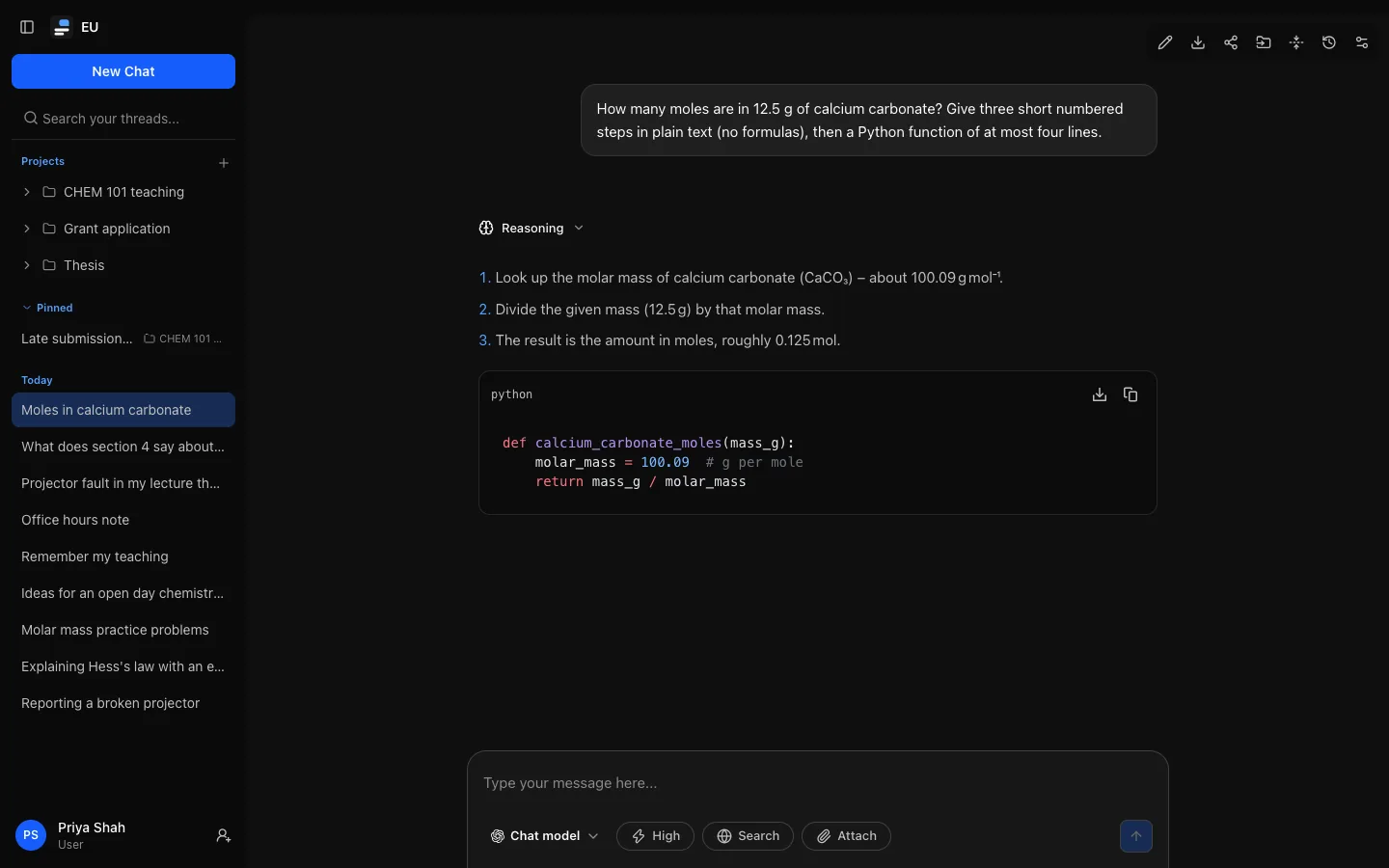
A conversation in Open Chat Interface: the person's question about the moles in 12.5 g of calcium carbonate, a collapsed "Reasoning" line above the reply, a reply with three numbered steps and a Python code block, and the composer with the model picker set to "Chat model" at High.

Who it's for

AI chat for many people, on your terms

OCI is for institutions that offer AI chat to many people under their own identity provider, budget and policies. People pick from the models you approve; administrators decide who gets what, how much, and for how long it is kept.

  • Governance that is enforced

    Budgets, per-role features and limits, retention and the audit log are enforced by the server, not just reported afterwards.

  • Your sign-in, your data

    OIDC and SAML single sign-on, with roles mapped from your identity provider. Conversations, files and logs stay in your own database and storage; prompts go only to the model providers you connect.

  • Accessibility you can test

    The interface targets WCAG 2.2 AA, and automated accessibility checks run on desktop and mobile in continuous integration.

  • Open source, no strings

    MIT licensed, with no contributor licence agreement. Rebrand it with your own name, logo and accent colour.

For people

What people get

One place to work with every model your institution offers, with the features people now expect from AI chat. Each of them can be switched on or off by administrators, for everyone or per role.

Conversations

Any approved model, one interface

Pick a model for each conversation; everything else works the same whichever you choose. Replies stream as they are written. A model's reasoning and tool steps gather in one block above the answer that names the current step and shows the latest reasoning live, then folds away to a one-line summary.

  • Your own defaults: a default model and reasoning level (Instant, Low, Medium, High) that follow you to every device, within what your role allows.
  • Edit, retry and fork without losing anything: retried replies stay one click away, and editing or forking starts a new conversation and keeps the original.
  • Attachments (images and documents), web search with cited sources, and temporary chats that stay out of your history and expire.
  • Search finds a conversation by its title or by what was said in it, and opens it at the matching message. Rename conversations, and jump around with keyboard shortcuts.
  • Long conversations are summarised in the background instead of cut off. Nothing is deleted, nothing waits for a summary, and a summary you asked for that fails says why.
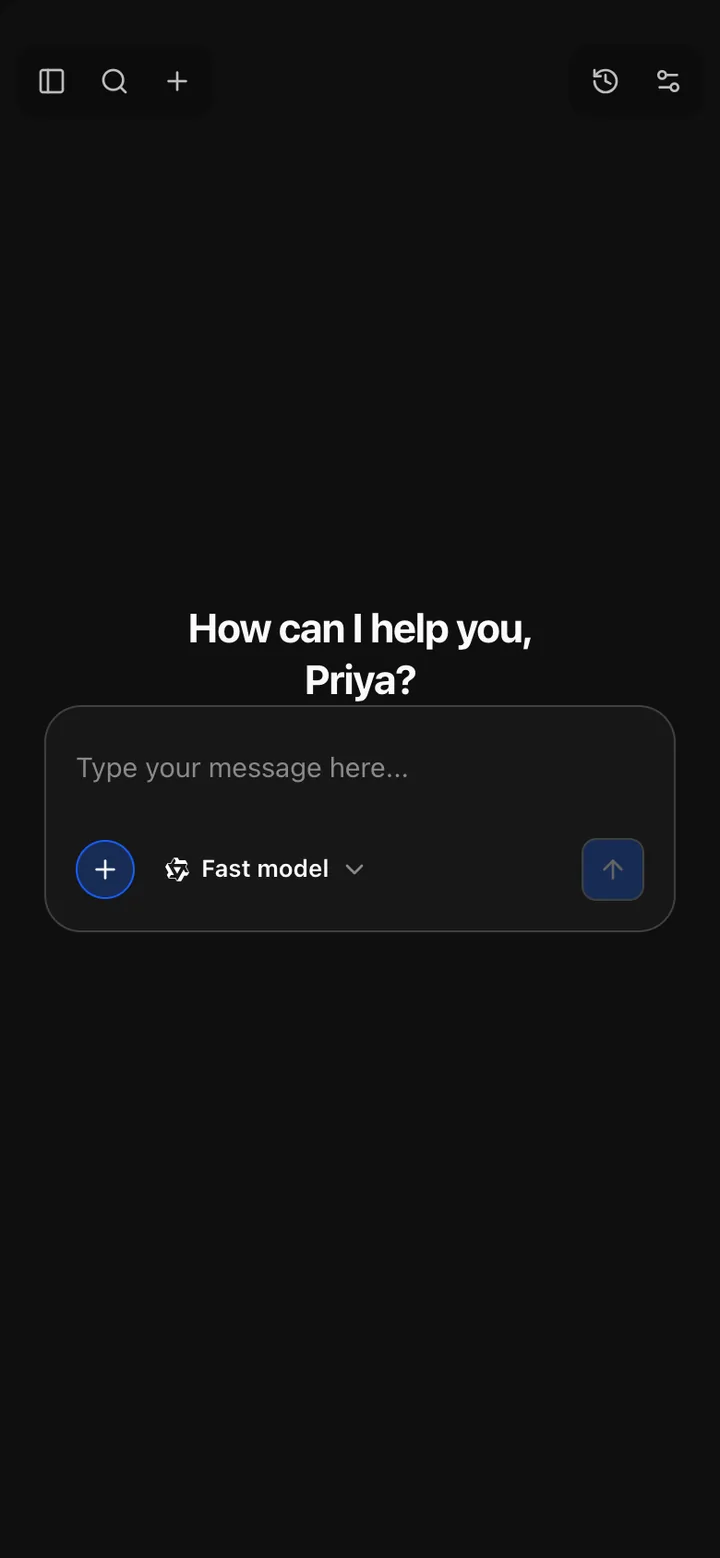
Open Chat Interface on a phone: the greeting "How can I help you, Priya?", the message box with an add button, the model picker set to "Fast model" and the send button, and buttons for the sidebar, search and a new chat at the top.
On a phone, the sidebar becomes a panel and the composer's controls fold behind one button.

Projects

Group work under shared instructions and files

A project holds instructions and up to 20 files, added to every conversation in it. Its conversations live under it in the sidebar.

  • When a project's files don't fit, each message gets the passages that best match it, labelled with file name, instead of leaving files out.
  • With an embeddings model configured, search is meaning-based as well as keyword-based, with optional reranking. Unrelated questions add no passages.
  • Replies show which passages they used, and you can leave chosen files out of a message.
  • Each project expands to its five most recent conversations, with the rest one click away.
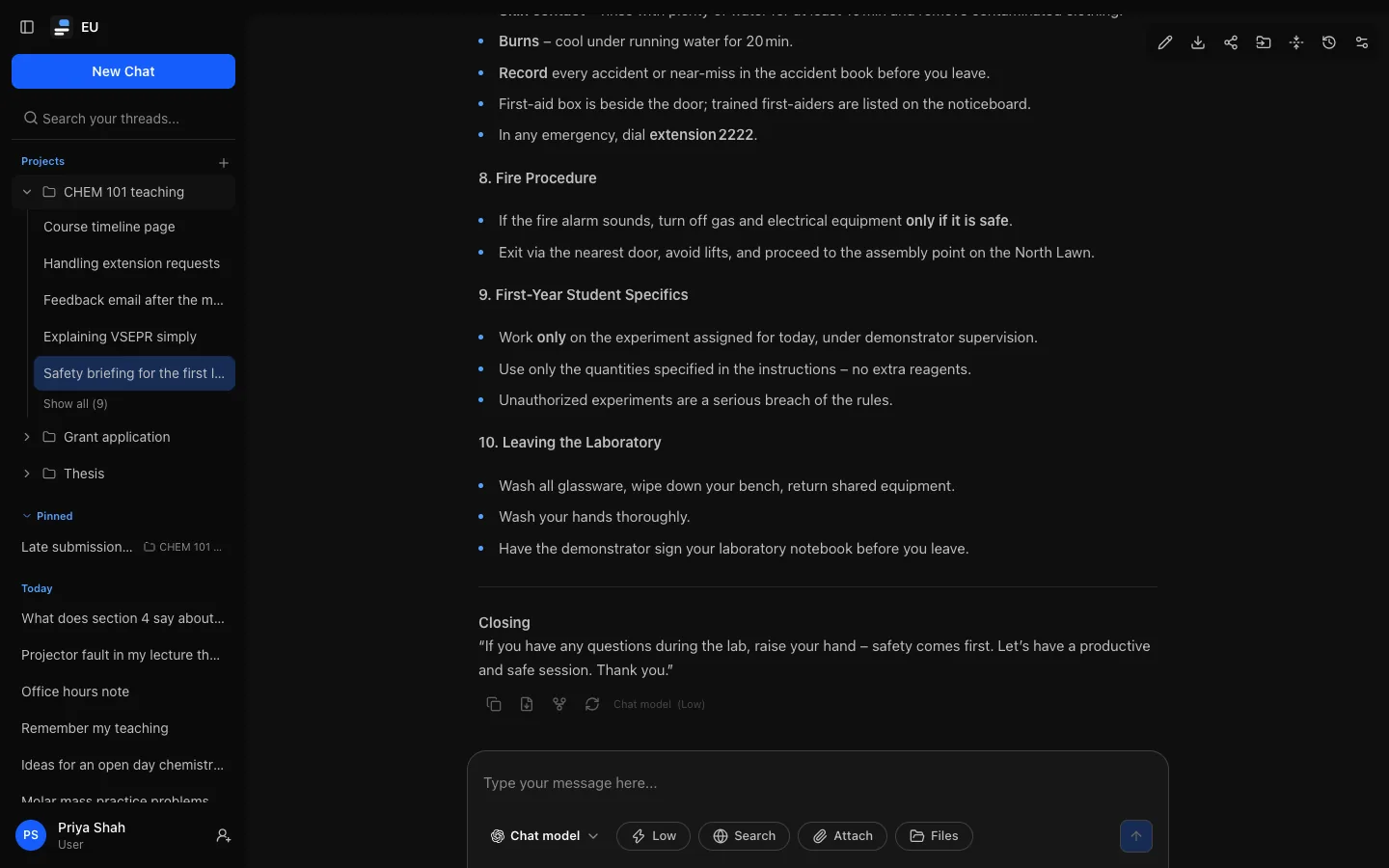
The sidebar with a Projects heading: one project expanded to its five most recent conversations and "Show all", two collapsed projects, then the Pinned and Today lists, beside an open conversation.
Project conversations live under their project in the sidebar. Each project has its own instructions and files.

Artifacts

Pages, diagrams and documents, written live

HTML pages, SVG images, Mermaid diagrams and documents from replies are kept as versioned artifacts. While a model writes one, you watch it arrive; on wide screens it opens in a panel beside the conversation that you can resize.

  • Versions, source and full screen, with copy and download. Markdown documents can be edited directly.
  • HTML and SVG run in a sandboxed frame with no network access, also on share links.
  • Export a reply or a document as DOCX, PDF, XLSX or PPTX. PDFs carry the fonts they need for every common script, including Chinese, Japanese, Korean, Arabic and Hebrew.
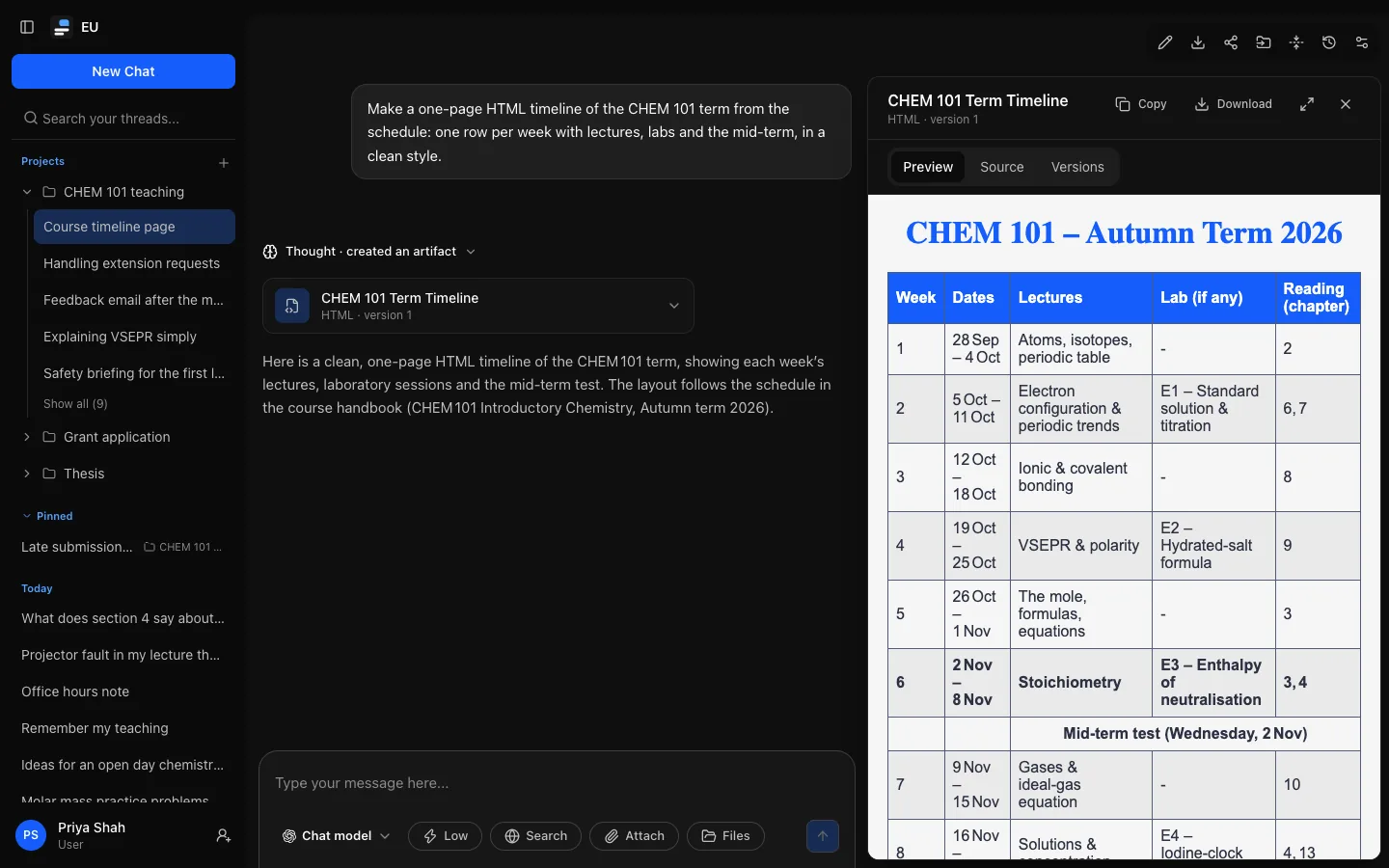
A reply that created an HTML artifact, its work block folded to "Thought · created an artifact" above the artifact's card, with the artifact docked beside the conversation: the panel header with its title and version, Copy, Download, full screen and Close, Preview, Source and Versions, and the rendered course timeline.
Artifacts open in a docked panel beside the conversation, with versions, the source and a full-screen view.

Tools and connectors

Tools that ask before they change anything

Models that support tool calling can search the web and use connected services during a reply. A tool that changes something elsewhere waits for you to choose Approve or Deny.

  • MCP connectors: administrators add remote MCP servers and enable their tools one by one, per role.
  • People connect their own accounts, so the connected system applies their own permissions.
  • Every tool call is audited with metadata only, never its inputs or results.

A tool that changes something waits for you

create_event · Example University calendar

Add “Thesis committee meeting” on Tuesday at 10:00?

An illustration. Read-only tools, such as web search, run without asking; write tools always ask.

Memory, sharing and export

Personal, and under your control

Settings let people shape replies to how they work, and see and take what is theirs.

  • Memory is opt-in at three levels: the instance, the role and the person. Notes are visible, editable and exported, and never used in temporary chats.
  • Share links publish a read-only view of a conversation, live or as a snapshot, with an optional expiry. Reasoning and attachments stay private, and one page lists every link you have made, to revoke any of them at once.
  • Export everything as a zip of Markdown, JSON, attached files and memory notes, and import conversation history exported from ChatGPT or Claude.
  • Devices: see where you are signed in, and sign out one device or all the others.
  • Delete your own account, where your institution allows it for your role.
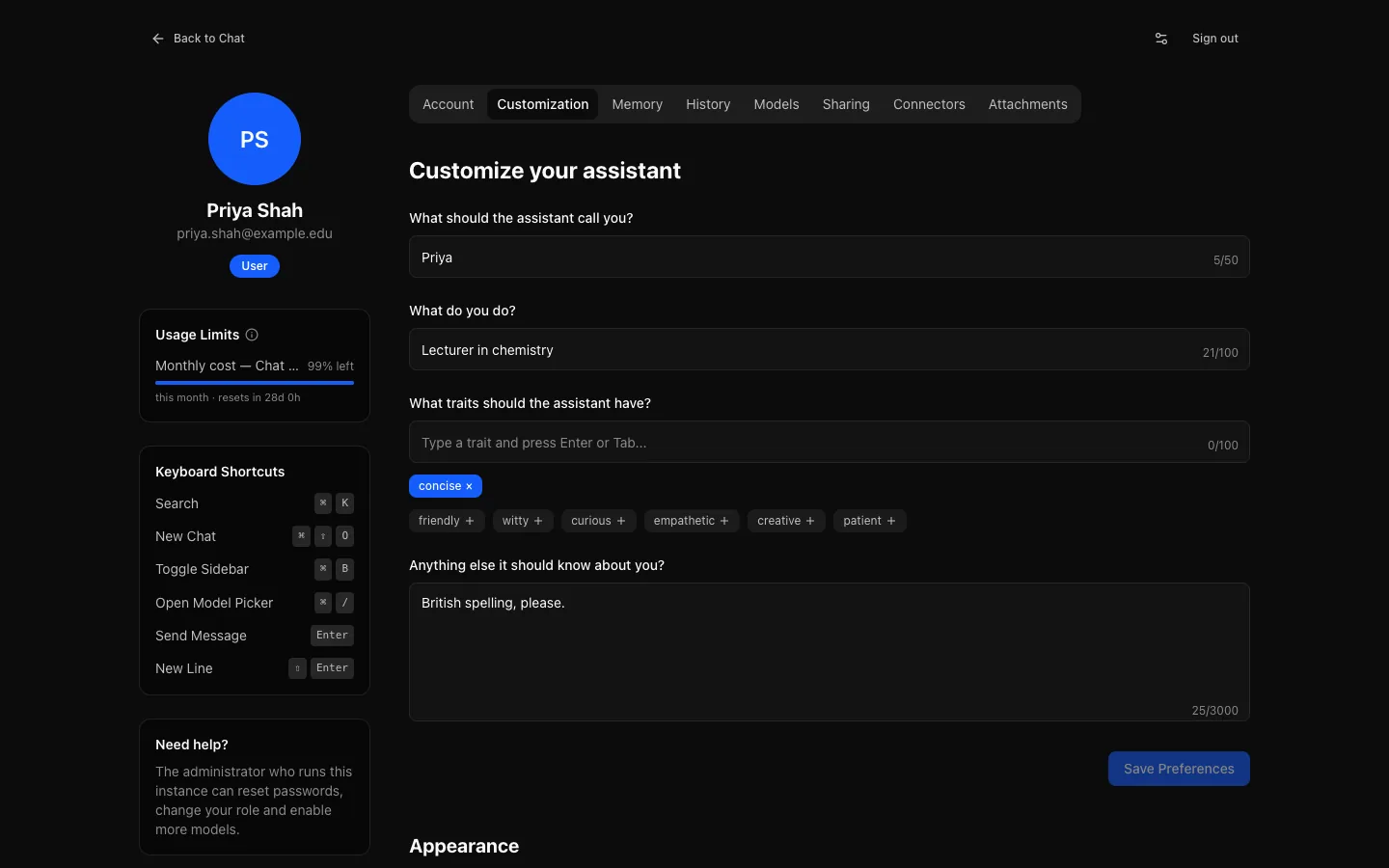
Settings, Customization: fields for what the assistant should call you and what you do, the chosen trait "concise", and a box for anything else it should know, beside a profile card, a Usage Limits card and the keyboard shortcuts.
Settings: personalise replies, choose the appearance, see your limits, and manage history, attachments and devices.

For administrators

What administrators get

An administration area organised by task, with guided setup. Almost everything is configured there and stored in the database; environment variables cover only connection strings, secrets and the first administrator.

Setup and roles

Guided setup, and one page per role

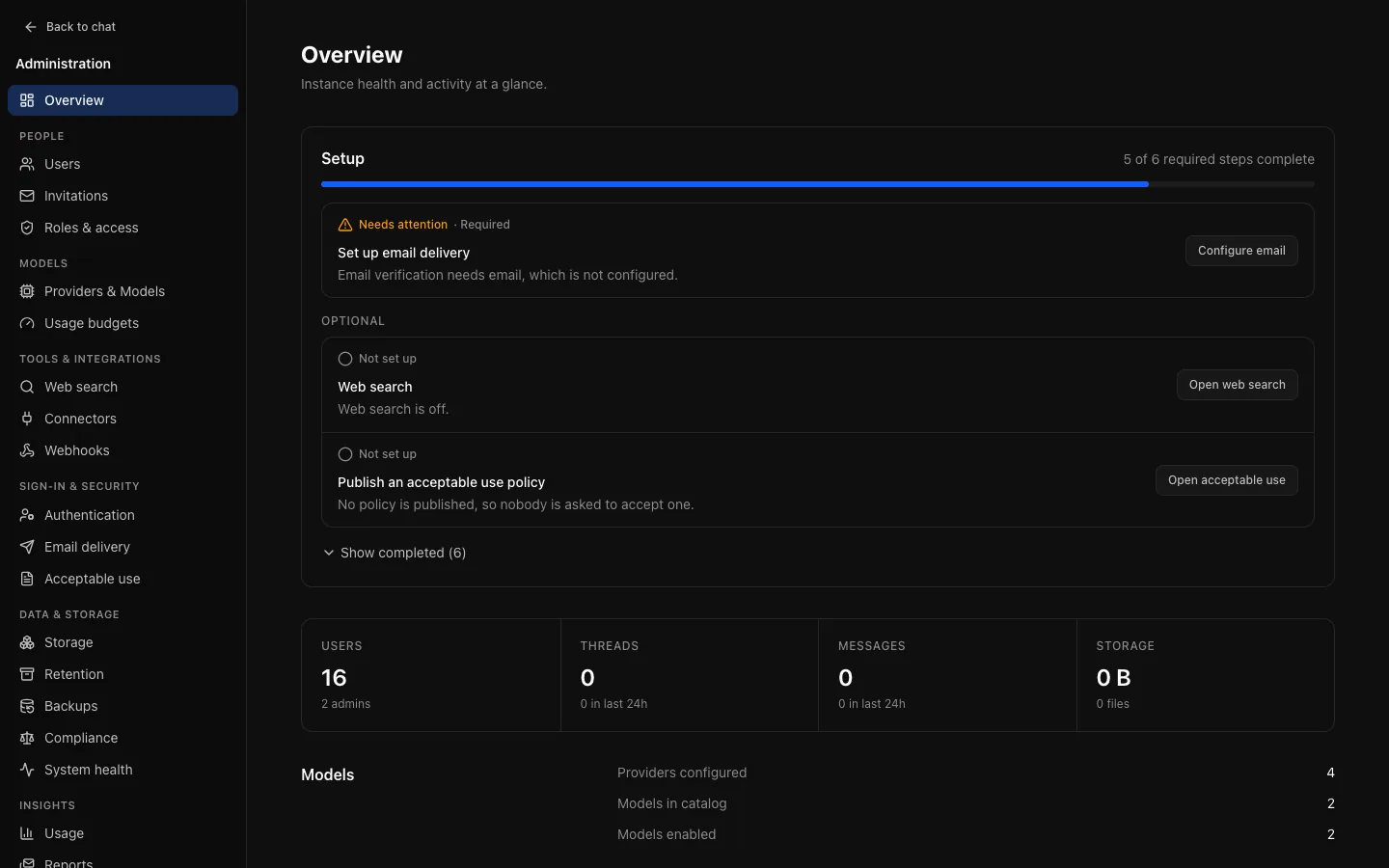
The setup checklist on the Overview lists what is still missing, in order, and links to each page. Roles & access then shows everything one role is held to.

  • Per-role features: web search, attachments, share links, temporary chats, branching, projects, memory, artifacts, self-service account deletion, tools and reasoning levels. The server enforces them, not just the interface.
  • Rate limits (concurrent replies, messages and uploads per minute) and a storage allowance (total size, number of files, largest file) per role.
  • Models: connect OpenAI, Anthropic, Google or any OpenAI-compatible server, then choose which models join the catalog, which roles see each one, and each model's context window and output limit.
  • An auditor role can open every administration page and change nothing.
  • Web search through a provider you choose, with a fallback provider for when it is slow or down.
The administration Overview: a setup checklist with 5 of 6 required steps complete, "Set up email delivery" marked Needs attention, optional items for web search and an acceptable use policy, and totals for users, threads, messages and storage.
The setup checklist shows what is still missing, in order, with a link to each page that fixes it.
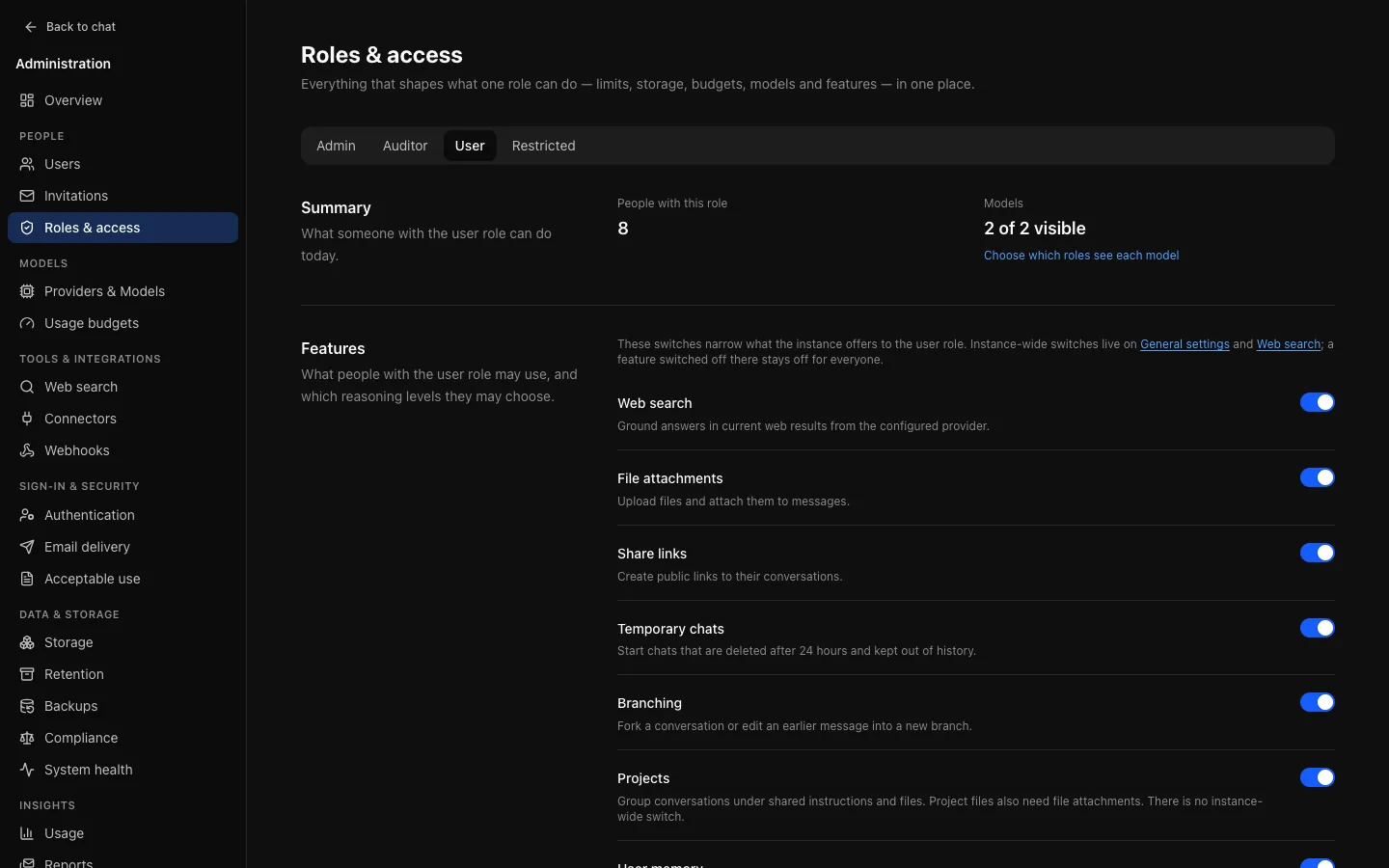
Roles & access with the User role selected: 8 people with this role, 2 of 2 models visible, and switches for web search, file attachments, share links, temporary chats, branching and projects.
Roles & access: one page per role for its models, features, rate limits, storage and budgets.

Usage budgets

Budgets in messages, tokens or cost

A budget caps consumption and applies to one or more roles; a role can carry several, and every one is enforced. Each person gets the full amount on their own.

  • Rolling windows (such as the last 24 hours) or calendar windows that reset daily, weekly or monthly in a timezone you choose.
  • Scope a budget to models, to be generous with an inexpensive model and strict with an expensive one. Cost uses per-model prices from the catalog.
  • People are warned at 80% and 95%. Administrators can grant one person more, with an expiry.
  • Each reply reserves its share before it starts and settles afterwards, so requests sent at the same time count against each other. Usage is kept, anonymised, after an account is deleted, so reports stay accurate.

Cost tracking needs the provider to report token usage. Budgets are estimates, not a hard cap on a provider bill; use provider-side spending controls where you need one.

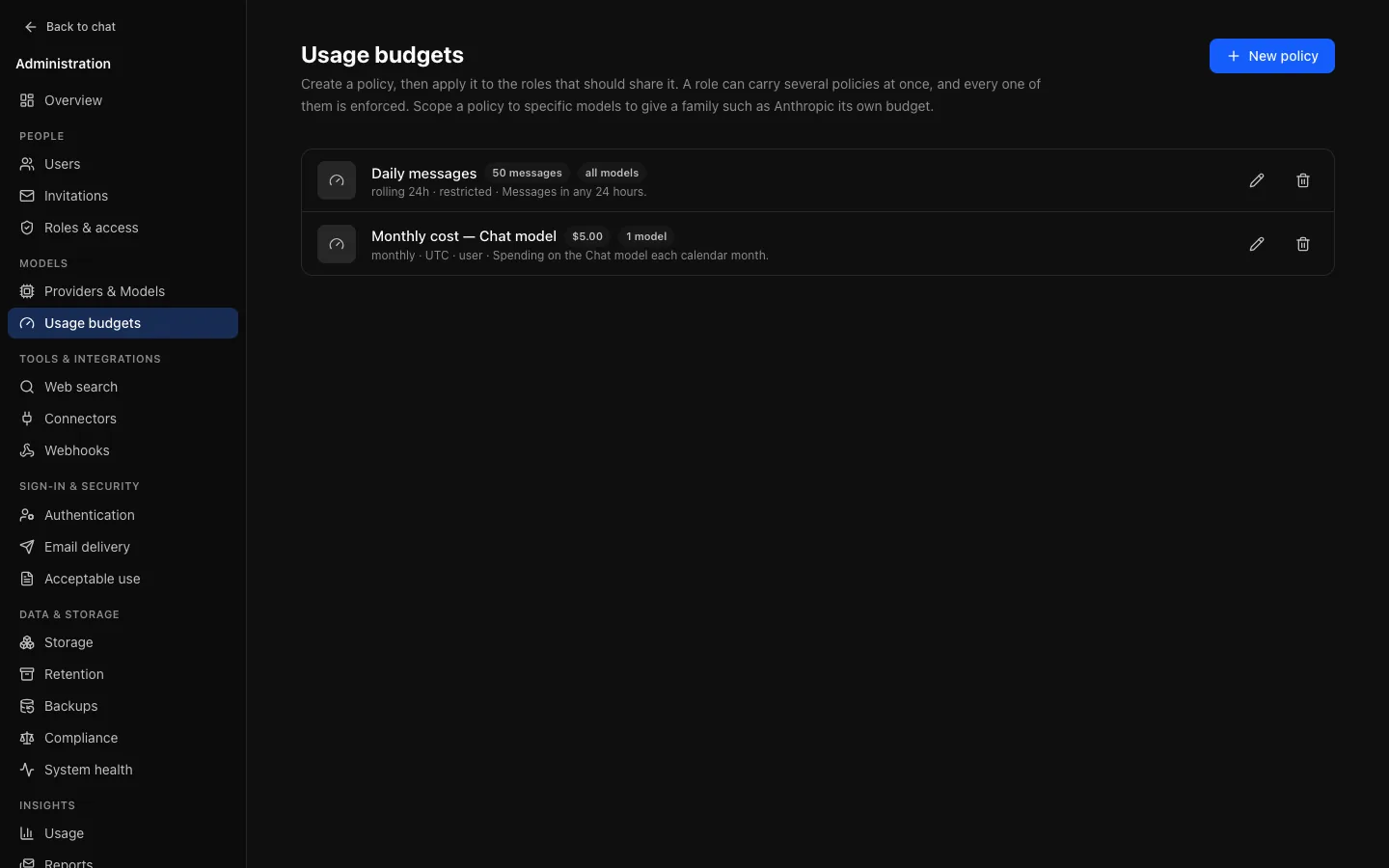
Usage budgets: a monthly cost policy scoped to one model and applied to the User role, and a rolling message policy applied to the Restricted role.
Budgets in messages, tokens or cost, over rolling or calendar windows, scoped to models and applied to roles.
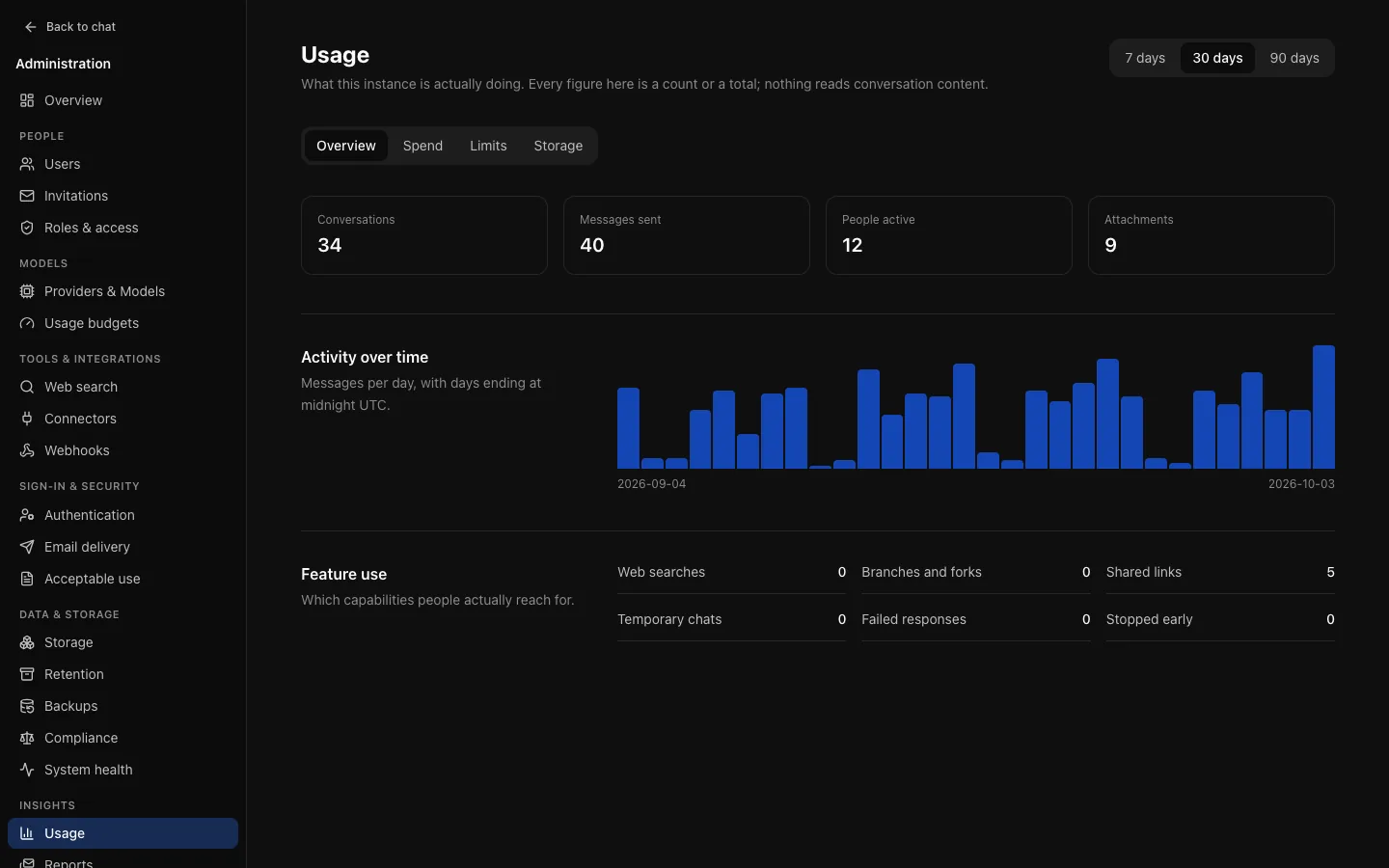
Usage over the last 30 days: counts of conversations, messages sent, people active and attachments, a bar chart of messages per day, and feature-use counts, with tabs for spend, limits and storage.
Usage shows counts and totals per person, model and feature. Nothing on it reads conversation content.

Retention, audit and compliance

Records your compliance office can rely on

Decide how long conversations, usage history, memory and audit entries are kept, and keep a structured record of who did what.

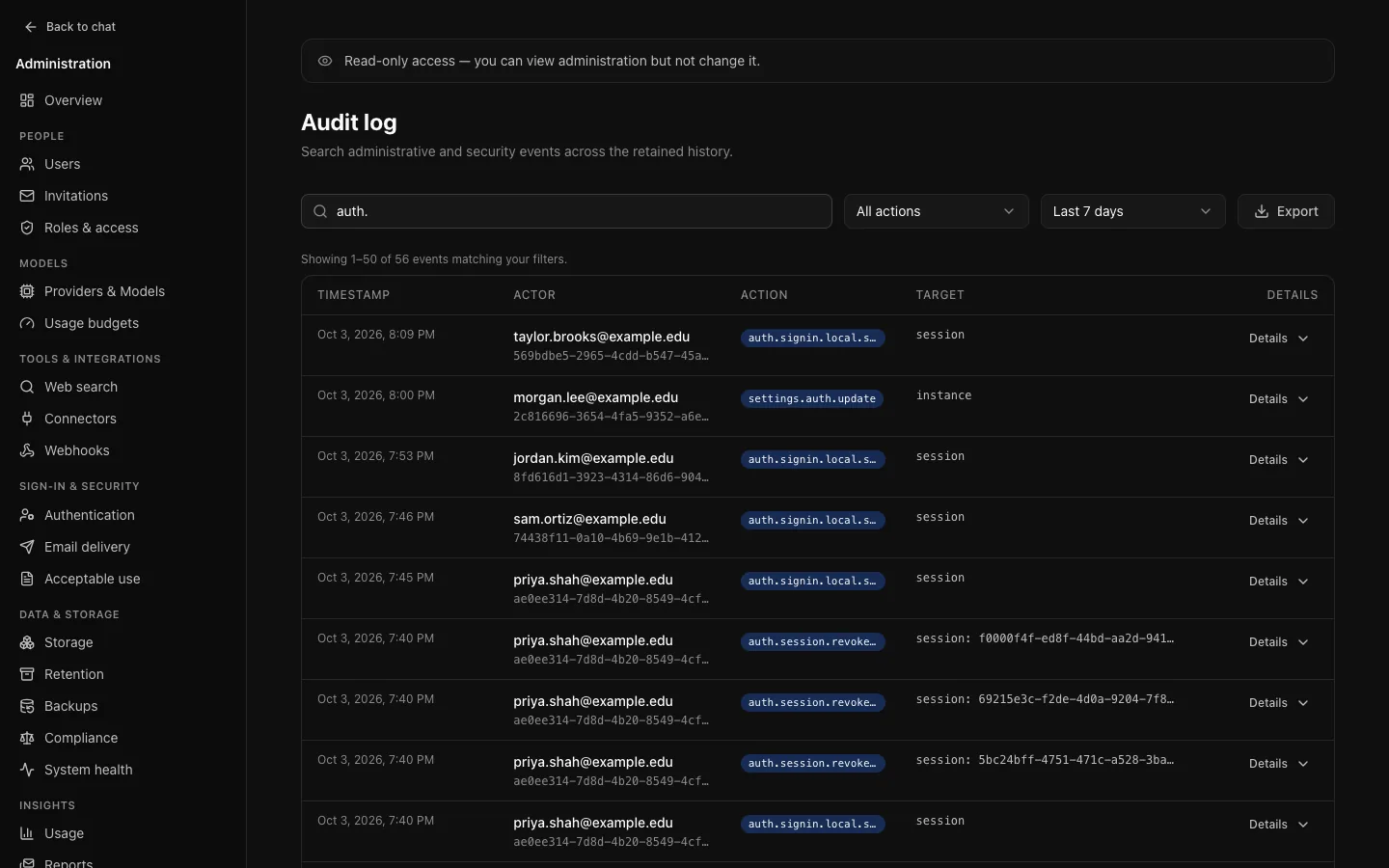
  • The audit log records administrative actions and sign-ins, failures included, with each setting's value before and after. Secrets are never logged. Export to CSV.
  • Access-control and security events are kept regardless of audit retention.
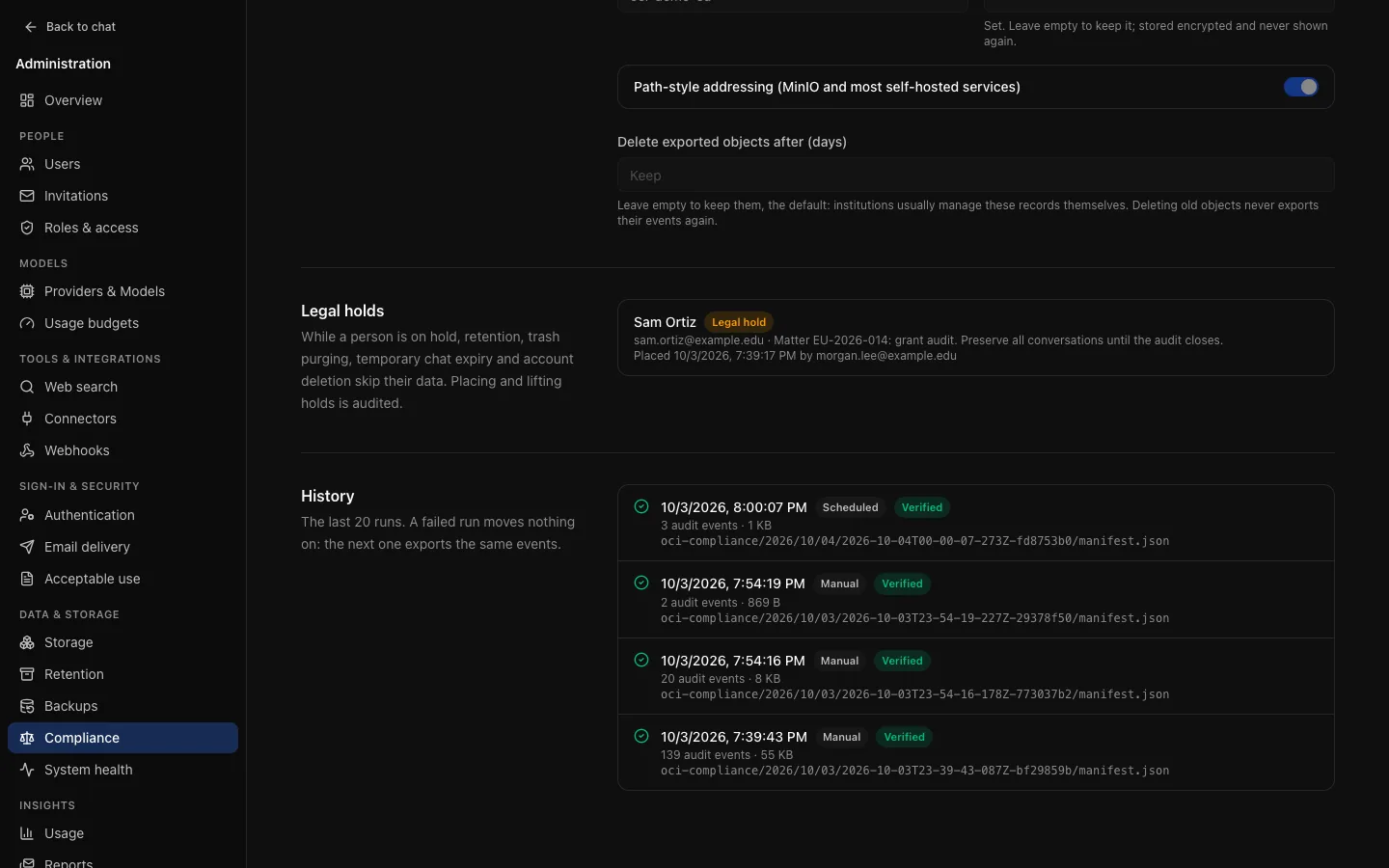
  • Compliance export: audit events, every deletion among them, and optionally conversation content, written hourly or daily to S3-compatible storage as verified JSON Lines, exactly once per event.
  • Legal hold covers every deletion: no retention job, purge or deletion removes a named person's records until the hold is lifted.
  • Scheduled usage reports by email, and a versioned acceptable-use policy people accept before they start.

A legal hold does not pause backup retention: old backups are still deleted on schedule.

The audit log in an auditor's read-only view: a search for "auth.", action and time filters, an Export button, and a table of sign-in and session events with their time, actor, action and target.
The audit log records administrative and sign-in events, failures included, and exports to CSV.
Data & storage, Compliance: a legal hold on one person with its matter reference, and the history of compliance export runs to an S3-compatible bucket, each verified.
Compliance export writes audit events, and optionally content, to S3 as JSON Lines. Legal holds pause retention and deletion.

Single sign-on, models and branding

Single sign-on

OIDC and SAML, with roles from your directory

Connect OIDC or SAML identity providers natively. Accounts are created at first sign-in, optionally limited to the email domains you allow.

Claim-to-role mapping grants a role when a claim, such as a group, carries a value, and is recalculated at every sign-in. Turn on Require a matching role and people who match no rule are refused with a message you write.

Local email and password accounts, invitations and email verification are there when you need them.
Branding

Your name, your logo, your colours

Set the instance name and short name, upload a logo, choose an accent colour (neutral, blue, violet or emerald) and the default theme, and write a message for the sign-in page.

Branding applies everywhere people meet it: the sign-in pages, the sidebar, browser tabs and their icon, share pages, verification and password-reset emails, diagram colours and exported files.

Announcements show a banner to everybody, for maintenance windows or news.

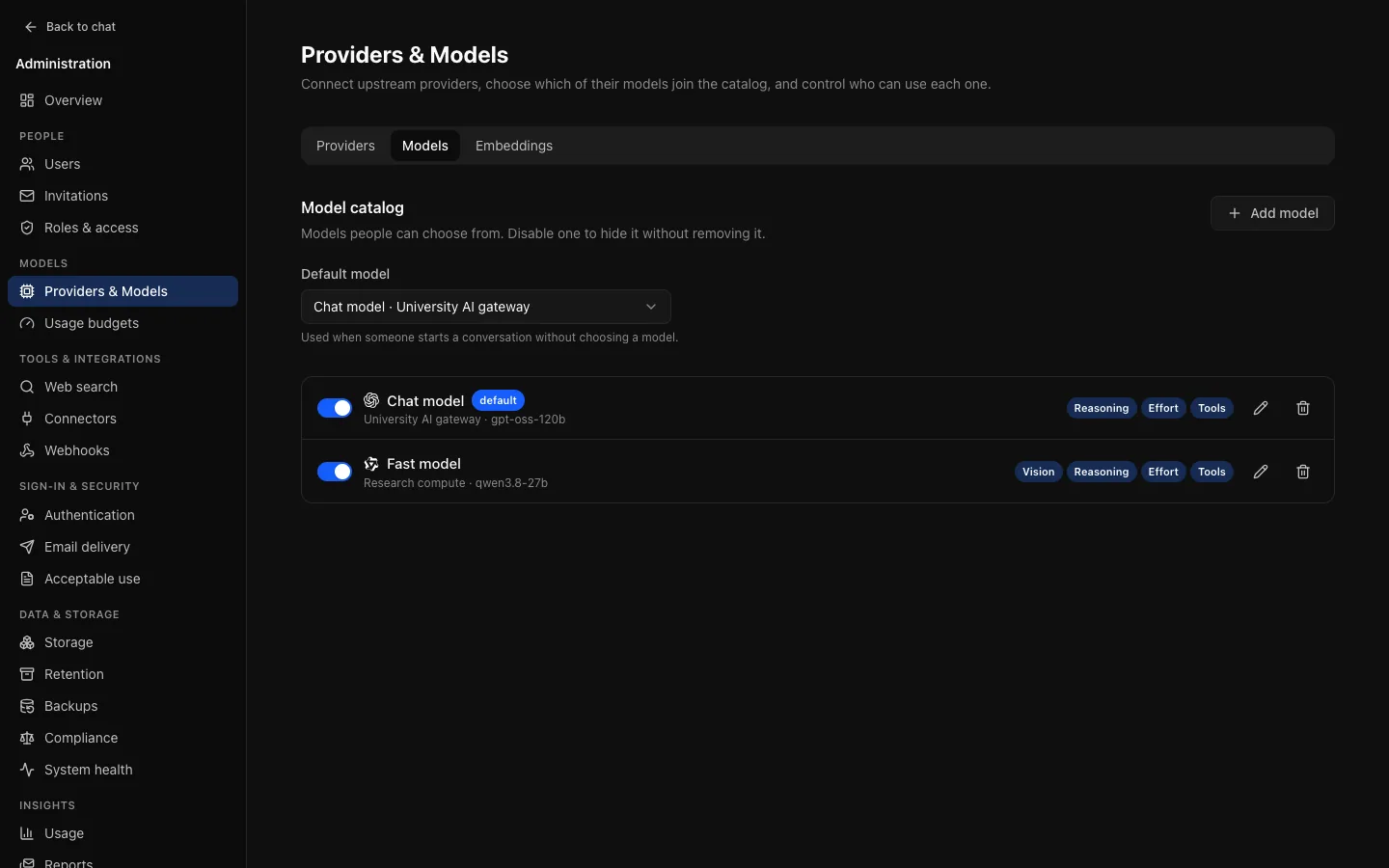
Providers & Models, Models tab: "Chat model" chosen as the default model, and the model catalog with Chat model and Fast model, each with its provider, upstream model, capability tags and an enabled switch.
Providers hold the credentials. You choose which of their models join the catalog, and which roles see each one.

Reliability and operations

One stack, built to keep running

Beside its own API and web containers, OCI needs PostgreSQL, plus Redis and S3-compatible storage as you grow. No other database or search service.

  • Migrations run once, under a lock. The API applies them on boot behind a PostgreSQL advisory lock, so replicas can start together; or give schema changes their own job.
  • Replies survive reloads. A reply keeps streaming through a disconnect or a page reload, can be stopped, and is reconciled against what was actually saved.
  • Automated backups: scheduled pg_dump to S3 with incremental, checksummed copies of attachment files, verified by reading them back, with daily and weekly retention and a script to restore the files.
  • Metrics and traces: a Prometheus endpoint behind a token, and OpenTelemetry traces. No conversation content in either.
  • Webhooks post selected audit events to your HTTPS endpoints, signed with HMAC-SHA256 and retried, with a delivery log.
  • System health shows whether each dependency answers, plus background jobs and storage.

Instances that set up backups before v0.10 keep listing attachments without copying them until an administrator turns copying on, since the first copy can be as large as all attachment storage.

Scale the API: migrate once, then start replicas
# once, before the rollout
docker compose run --rm migrate

# then start the replicas
RUN_MIGRATIONS=false docker compose up -d \
  --no-build --scale api=3

Before you run more than one replica

  • Use S3-compatible storage, so every replica sees every attachment.
  • Connect Redis, so rate limits and stream recovery work across replicas.
  • No sticky sessions are needed: sessions are signed cookies and streams resume through Redis.

Production operations guide

Accessibility and open source

Accessibility

WCAG 2.2 AA, tested in CI

The interface targets WCAG 2.2 Level AA. An automated scan tagged for 2.2 AA runs across sign-in, chat, settings, administration, share pages and dialogs, on desktop and mobile viewports.

Automation covers only about a third of the success criteria, so the tests also encode a manual keyboard pass: a skip link as the first tab stop, a visible focus indicator on every control, and dialogs that return focus to whatever opened them.

Colours are chosen for contrast first, including destructive buttons.

A published accessibility conformance report, backed by a manual audit, is on the roadmap.

Open source

MIT licensed, no CLA, white-label

OCI is released under the MIT licence, and there is no contributor licence agreement to sign before you contribute.

Rebrand it with your own name and logo, run it for as many people as you like, and change the code if you need to.

It is built with React, Hono, PostgreSQL and Redis, and every change is checked by lint, type checks, unit and integration tests, and browser tests.

How it works

Self-host in minutes

The Compose file in the repository starts the web and API containers with PostgreSQL and Redis. All you need is Docker.

Build and start Open Chat Interface with Docker Compose
git clone https://github.com/ncecere/open-chat-interface.git
cd open-chat-interface/docker
cat > .env <<EOF
POSTGRES_PASSWORD=$(openssl rand -hex 24)
AUTH_SECRET=$(openssl rand -base64 48)
ENCRYPTION_KEY=$(openssl rand -base64 48)
APP_URL=http://localhost:8080
INITIAL_ADMIN_EMAIL=admin@example.edu
EOF
docker compose up -d --build
docker compose logs api     # shows the one-time admin password
  1. The API applies migrations and default settings on first boot, and creates the first administrator from INITIAL_ADMIN_EMAIL.
  2. Open http://localhost:8080, sign in, and open Admin. The setup checklist walks you through the rest.
  3. Add a provider and enable at least one model under Models → Providers & Models, and choose the default. No model is available to anyone until you enable one.

Running it for real

Point the same containers at your own services:

  • PostgreSQL 17 (pgvector optional, for meaning-based project search)
  • Redis: recommended, and needed for more than one API replica
  • S3-compatible storage, for more than one API replica, backups and compliance export
  • A model provider: OpenAI, Anthropic, Google, or an OpenAI-compatible gateway
  • Optionally an OIDC or SAML identity provider, and SMTP for email

What's next

Where Open Chat Interface is going

The roadmap is a plan, not a promise: an item ships only when it has a design, tests and documentation.

Now: v0.11, always on
The plan: upgrades from the previous minor release with no downtime on large deployments, surviving a database failover partway through, and tested rather than promised. A Helm chart, connection pooling and arm64 images are planned alongside.
Later: v1.0 and beyond
Planned after that: assistants, code execution, deep research, image generation, voice, groups and finer roles, and multi-factor authentication for local accounts.
Today: pre-1.0
v0.10.2 is the current release. Expect changes between minor releases: take a backup and read the upgrade notes before you upgrade.

Read the v0.10.2 release notes, the changelog and the roadmap.